Showing posts with label Paper Sculpture. Show all posts

Wednesday, March 24, 2021

Minnie Mouse Paper Sculpture

Hi friends, finally got some spare time to finish this paper sculpture of Minnie Mouse all dressed enjoying some beautiful flowers.  Minnie Mouse was inspired by the photo I found on Pinterest.  I illustrated Minnie Mouse and the white decorative frame in Adobe Illustrator and cut with Cricut.  The green swirls and flowers are dies from Heartfelt Creations, the tiny little flower centers are a couple of punches I purchased ages ago.


Thank you for your visit.

Angelica 

Monday, September 14, 2020

Penny Arcade Paper Sculpture

Hi everyone, finished another paper sculpture.  This is the Penny Arcade building from Disneyland.  Sketched the building in Procreate with an iPad Pro and Apple Pencil, once sketched I bring the drawing into Adobe Illustrator and draw all the layers and details of the building.  After the drawing is complete I format to an svg file and send to the Cricut for cutting.  Some of the pieces where a bit to small for the Cricut to cut so I cut with a craft knife.
Thank you for your visit.

Angelica 

Size:  7 1/2” x 7 1/2”

Supplies:

Heartfelt Creations and Supplies Carried by HC

Art Glitter Dries Clear Adhesive

Art Glitter Metal Glue Tip

Foam Dots 1/8” thick


Paper:  Bazzill Cardstock (White-Avalanch, blue, Dark Blue, Yellow, Dark Orange, Dark Berry, Brown), Coordinations (Black-Nightfall), Cream Textured Cardstock, Vellum (White, Red)

Accessories:  Adobe Illustrator, Procreate, Cricut Design Space, Cricut Explorer Ari 2, Wacom Cintiq, iPad Pro, Apple Pencil, Transparency film, foam dots, Gold Pens

Monday, August 24, 2020

Disneyland Fire Dept. Paper Sculpture

Hi friends, I have been having fun illustrating some of the Disneyland buildings and creating paper sculptures of them.  This is the Disneyland Fire Dept. building, I designed and illustrated the building in Adobe Illustrator and formatted to cut with the Cricut.  Lots of tiny pieces to assemble and had a lot of fun putting it together.

Had to draw lots of little bricks, that took some time!

Thank you for your visit.


Angelica


Size:  6” x 7 3/4"

Supplies:

Heartfelt Creations and Supplies Carried by HC

HCST1-401 Heartfelt Creations Deluxe Flower Shaping Kit

8.5” x  11” Clear Cardstock

Fantastic Blending Tool

Art Glitter Dries Clear Adhesive

Art Glitter Metal Glue Tip


Image Colored With:  Prismacolor Color Pencils, Faber-Castell Pitt Pastel Pencils

Paper:  Bazzill Cardstock (White; Avalanch, Black; Blackbird, Light Gray, Dark Gray, Warm Gray, Cream, Rose, Red, Yellow), Smooth Cardstock (Green), Gold Metallic Paper

Accessories:  Adobe Illustrator, Procreate, Cricut Design Space, Cricut Explorer Air 2, Wacom Cintiq, iPad Pro, Apple Pencil, foam dots

Monday, August 10, 2020

Disneyland's Fargo's Palm Parlor Building

Hi friends, I had some fun creating another paper sculpture, this is the Fargo’s Palm Parlor building at Disneyland’s Main Street.  

I illustrated the image in Adobe Illustrator and formatted to cut with the Cricut.  Some of the pieces are a bit too small for the Cricut to cut so I cut with a craft knife and scissors.   
Thank you for your visit.

Angelica

Size:  5 1/8” x 7 7/8”

Supplies:

Heartfelt Creations and Supplies Carried by HC

Art Glitter Dries Clear Adhesive

Art Glitter Metal Glue Tip

Foam Dots 1/8” thick

Scor-Pal Scoring Board


Image Colored With:  Faber-Castell Pitt Pastel Pencils

Paper:  Bazzill Cardstock (White; Avalanche, Black; Blackbird, Light Gray, Dark Gray, Bright Blue, Medium Blue, Dark Blue, Brown), Chipboard

Accessories:  Adobe Illustrator, Adobe Photoshop, Procreate, Cricut Design Space, Cricut Explorer Air 2, Wacom Cintiq, iPad Pro, Apple Pencil, foam dots, craft knife

Sunday, July 19, 2020

Main Street Cinema Paper Sculpture

Hi friends, today I’m sharing another paper sculpture I designed.  I just love creating this pieces.  This one is based on the Main Street Cinema at Disneyland.  
I used several photos of the building as my inspiration, I start by doing a sketch of the building in Procreate to plan the layers and colors, once that is complete I draw everything in Adobe Illustrator.  After the file is complete in Illustrator I format and upload to Cricut Design Space to cut with the Cricut.

Once all pieces are cut I start drawing the details with color pencils and inks.  For this one I hand drew and colored all the brick.  The finished size is 7 1/2” wide by 7 1/2” tall.
Thank you for your visit.

Angelica

Size:  7 1/2” x 7 1/2”

Supplies:

Heartfelt Creations and Supplies Carried by HC

HCST1-401 Heartfelt Creations Deluxe Flower Shaping Kit

Fantastic Blending Tool

Art Glitter Dries Clear Adhesive

Art Glitter Metal Glue Tip

Foam Dots 1/8” thick


Inks:  Distress ink (rusty hinge, ground espresso), Distress Oxide (wild honey)

Image Colored With:  Prismacolor Color Pencils, Tombow Markers, Finetec Mica Watercolor Paint M600 Set, Faber-Castell Pastel Pencils, Pebbles Ink. Chalks basic brights

Paper:  Bazzill Cardstock (White, light gray, medium gray, dark gray, black, light blue, light yellow, yellow, red, coral, light green, dark aqua, brown)

Accessories:  Liquid Pearls (Buttercup, Silver Pearl), foam tape, Adobe Illustrator, Adobe Photoshop, Procreate, Cricut Design Space, Cricut Explorer Air 2, Wacom Cintiq, iPad Pro, Apple Pencil


Monday, May 18, 2020

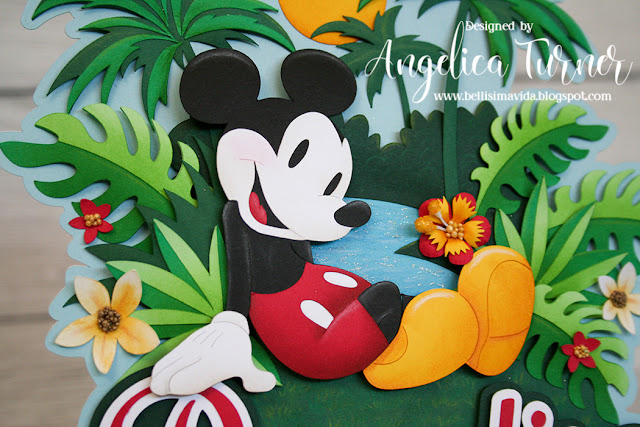
Paradise Mickey Paper Sculpture

Hi friends, for the last couple of months I have been doing some illustrations with Adobe Illustrator, I had been wanting to learn how to create illustrations so I could have my Cricut cut all the images and then create dimensional paper sculptures.

I used the Aulani poster as my inspiration for this piece, and I finally finished it.  After lots of learning and trial and error, I got it done and I’m so happy with the final piece.   I used Adobe Illustrator to draw all the images, each color is a separate image I drew, once everything was drawn in illustrator and formatted I uploaded the file to Design Space and had the Cricut cut all the little pieces.  I used distress inks, Prismacolor color pencils and chalk pencils to add all the detail shading and highlights of the image.  It was a lot of fun assembling it and seeing it all come together.


Thank you for your visit.

Angelica

Size:  8” x 7 1/2”
Supplies:
Heartfelt Creations and Supplies Carried by HC

Inks:  Distress Inks (fossilized amber, mowed lawn, peeled paint, evergreen bough, salty ocean, aged mahogany, pumice stone)
Image Colored With:  Prismacolor Color Pencils, Faber-Castell Pitt Pastel Pencils
Paper:  Smooth Cardstock (white, black, red, yellow, blue, 4 shades of green),
Accessories:  Adobe Illustrator, Cricut Design Space, Cricut Explore Air 2, Art Glitter Microfine Transparent (Shell White)